






Looking for a fast and easy way to create videos without spending hours editing? You’re in the right place.
InVideo promises to turn your ideas into full videos using AI, helping you generate content quickly for social media, YouTube, or promotional clips. But is it really worth your time and money? In this InVideo review, you’ll discover what this tool does best, where it falls short, and whether it fits your needs—whether you’re a casual creator or a social media marketer aiming to produce videos in bulk. Ready to find out if InVideo can simplify your video-making process? Check it out here: InVideo.
Introduction To Invideo: The Ultimate Video Editor
InVideo stands out as a powerful and easy-to-use video editor designed to simplify video creation. It offers a range of features suitable for beginners and experienced users alike. This tool helps transform ideas into polished videos quickly.
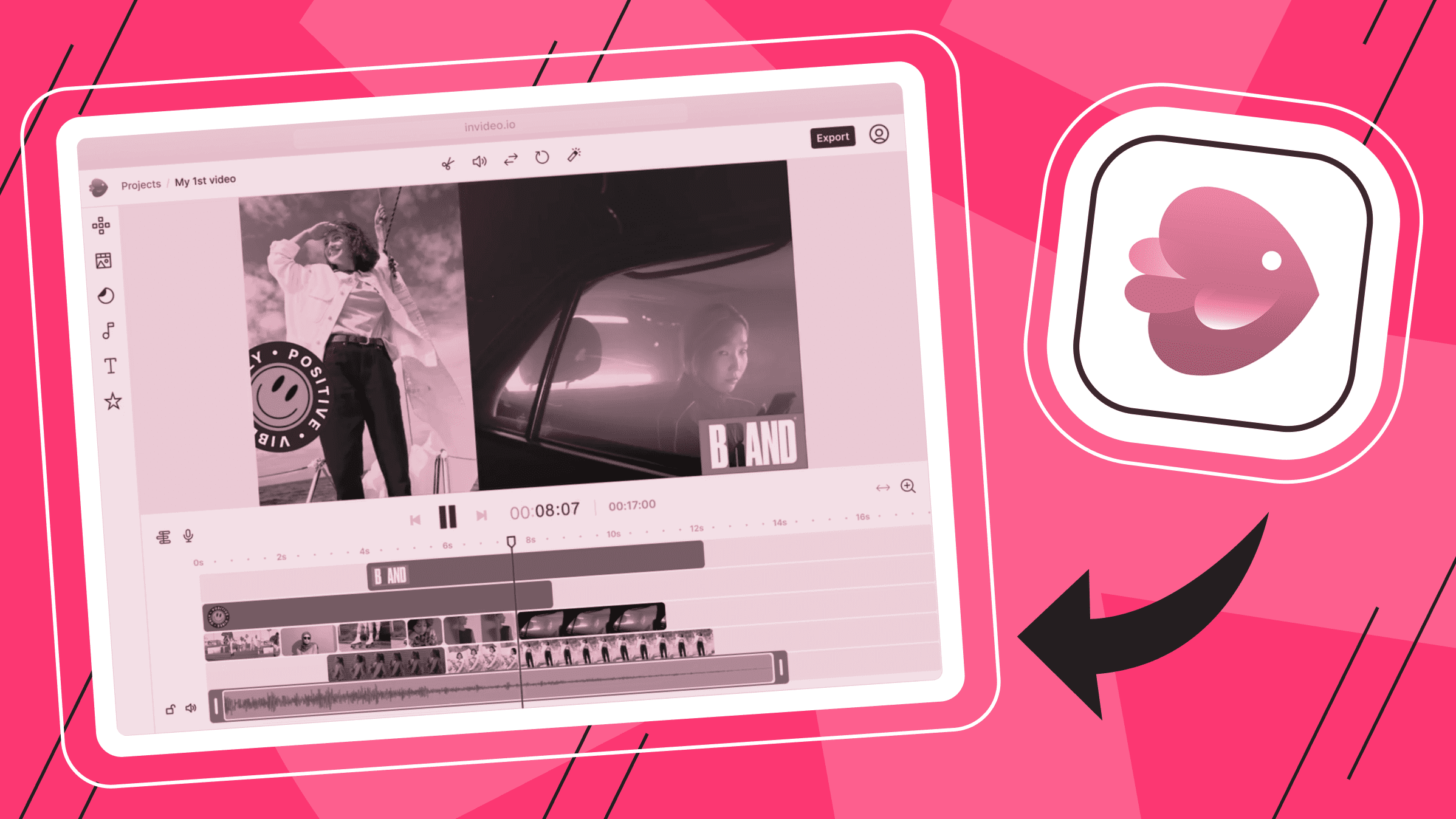
Its interface guides users step-by-step, making video editing accessible and efficient. The platform also supports AI-driven video production, helping to plan and build storyboards from simple concepts.
What Is Invideo And Who Is It For?
InVideo is an online video editing platform that enables users to create professional videos without complex software. It caters to a wide audience, including:
- Small business owners promoting products
- Content creators for YouTube and TikTok
- Marketers needing quick, attractive social media videos
- Educators preparing instructional content
- Anyone wanting to produce videos with minimal effort
The platform suits users with little to no video editing experience. Its AI features assist in video planning, voiceovers, and subtitles, covering the entire workflow efficiently.
Overview Of Invideo’s Purpose And Core Capabilities
The primary goal of InVideo is to make video creation simple and fast while maintaining a professional look. Core capabilities include:
| Feature | Description |
|---|---|
| AI-Powered Storyboarding | Transforms ideas into full video storyboards automatically. |
| Pre-Made Templates | Hundreds of customizable templates for various video types. |
| Video Editing Tools | Trim, crop, add text, transitions, and effects easily. |
| Auto Subtitles & Voiceover | Generate subtitles and AI voiceovers for accessibility. |
| Export Options | Download videos in HD for social media or presentations. |
InVideo supports users who need quick content creation without sacrificing quality. It offers free use with limited credits and paid plans for expanded features.
Credit: blog.ishosting.com
Key Features That Set Invideo Apart
InVideo offers a suite of powerful tools that simplify video creation. Its features cover every step, from scripting to sharing. These tools save time and help create quality videos without complex software. The platform suits beginners and casual users well.
Ai-powered Video Creation: From Script To Storyboard
InVideo uses AI technology to turn simple ideas into full video storyboards. This feature plans your video like a professional production. You start with a script or concept, and the AI builds scenes and sequences automatically.
This process removes guesswork and speeds up video creation. It helps users focus on content, not technical details. The AI also suggests edits and improvements for better flow.
Extensive Stock Footage And Media Library
Access to a vast library of stock videos, images, and music is key. InVideo provides thousands of media assets ready to use in any project. This library covers many topics and styles, perfect for diverse video needs.
- High-quality stock footage and photos
- Royalty-free music and sound effects
- Easy drag-and-drop media integration
Users save time by not searching outside for content. This keeps projects consistent and professional.
Automated Voiceover And Subtitle Integration
Adding voiceovers and subtitles is simple with InVideo’s automation. The tool converts text to speech with natural-sounding voices. You can customize tone and language to fit your video style.
Subtitles generate automatically, improving accessibility and engagement. This feature suits social media videos where captions boost views.
User-friendly Interface Designed For Speed
The interface is clean and intuitive. It helps users create videos quickly without confusion. Tools and options are easy to find and use.
Templates and presets guide users through design choices. Even beginners can produce polished videos fast. The platform’s layout supports smooth workflow and minimal learning curve.
Social Media Optimization And Export Options
InVideo offers presets tailored for popular social media platforms. This ensures videos meet size and format requirements easily.
| Platform | Recommended Video Format | Aspect Ratio |
|---|---|---|
| MP4 | 1:1 (Square) | |
| MP4 | 16:9 (Landscape) | |
| TikTok | MP4 | 9:16 (Vertical) |
| YouTube | MP4 | 16:9 (Widescreen) |
Export options include HD quality and direct sharing links. This streamlines publishing and boosts video reach.
Benefits Of Invideo’s Unique Features
InVideo offers a set of unique features that simplify video creation. These features save time and improve the quality of videos. Users can create professional videos without needing advanced skills. The platform supports creativity and efficiency, making it suitable for many content creators.
How Ai Storyboarding Saves Time And Boosts Creativity
InVideo uses AI storyboarding to plan videos from a single idea. This feature builds a full storyboard automatically. It reduces the time spent on planning scenes and sequences.
Creators can focus on refining their message rather than starting from scratch. AI suggests scenes, text, and visuals that fit the topic. This helps users generate fresh ideas and keep videos engaging.
Enhancing Video Quality With Diverse Stock Media
InVideo provides access to a large library of stock images, videos, and audio. This variety improves the overall video quality. Users can pick media that matches their style and message.
- Thousands of high-quality clips and photos
- Music tracks and sound effects for mood setting
- Customizable templates with built-in media
Using diverse stock media makes videos look professional and polished. It saves time compared to sourcing media from other places.
Improving Accessibility And Engagement Via Auto-subtitles
Auto-subtitles in InVideo increase video accessibility. Subtitles help viewers who are deaf or hard of hearing. They also allow watching videos without sound, common on social media.
The subtitles are generated automatically and synced with speech. This reduces manual work and editing time. Clear subtitles boost viewer engagement and message retention.
Simplifying Workflow For Social Media Marketers And Creators
InVideo is designed to fit the fast pace of social media content creation. Its simple interface and ready-to-use templates speed up the process. Users can create videos tailored for platforms like Instagram, TikTok, and YouTube.
Key workflow benefits include:
- Drag-and-drop editing
- Pre-sized formats for different platforms
- Fast export options
- Collaborative tools for team projects
This simplification helps marketers and creators produce more content in less time.
Why Fast Draft Generation Matters For High-volume Content
Generating video drafts quickly is crucial for creators producing many videos. InVideo’s fast draft generation lets users see rough versions almost instantly.
This speed allows:
- Early review and feedback
- Multiple revisions without delay
- Meeting tight deadlines
Fast drafts keep the content pipeline active and reduce bottlenecks in production. It supports scaling video output while maintaining quality.
Credit: www.buzzcube.io
Pricing And Affordability: What You Need To Know
InVideo offers flexible pricing options for various users. Whether you want to try it free or need advanced features, understanding the plans helps you pick what fits your needs. This section breaks down the free plan, premium plans, how InVideo stacks against competitors, and if it offers good value.
Free Plan: Features, Limitations, And Who It’s Best For
The free plan lets users explore basic video creation without a cost. It includes:
- Access to limited templates and video formats
- Standard media library with some free stock footage and music
- Export videos with InVideo watermark
- Up to 60 videos per month
Limitations: The watermark may affect professional use. Some advanced editing features and premium content remain locked. Export resolution caps at 720p.
Best for: Beginners, hobbyists, or those testing InVideo before upgrading.
Premium Plans: Credit System Explained And Cost Breakdown
InVideo’s premium plans use a credit system for extra features and assets. Credits cover premium templates, stock clips, and higher export qualities.
| Plan | Monthly Cost (USD) | Credits Included | Key Features |
|---|---|---|---|
| Business | $15 | 100 credits | No watermark, 1080p exports, premium templates |
| Unlimited | $30 | Unlimited credits | All features unlocked, priority support, team collaboration |
Credits reset monthly and unused credits do not roll over. Extra credits can be bought separately for about $1 each. Premium plans unlock full access to InVideo’s media library and advanced editing tools.
Comparing Invideo’s Pricing With Competitors
Competitors like Canva and Animoto offer similar pricing tiers. Canva Pro costs around $12.99/month with unlimited video exports but fewer AI video features. Animoto starts at $15/month but limits HD exports on lower plans.
InVideo’s pricing is competitive, especially with AI-assisted editing and credit-based premium content. Its focus on video creation suits businesses and creators wanting quick, polished videos.
Value Assessment: Is Invideo Worth The Investment?
InVideo fits well for small businesses, marketers, and content creators needing easy video tools. The free plan offers a solid start but has key limits. The Business plan provides good value for regular users needing watermark-free videos and HD exports.
Unlimited plan benefits heavy users or teams needing full access and collaboration. The credit system can be costly if premium assets are frequently used.
Bottom line: InVideo balances features and cost well. It is worth investing in if video quality and editing speed matter more than the lowest price.
Real-world Pros And Cons Of Using Invideo
InVideo offers a practical video creation experience. It suits beginners and casual users well. The tool helps create videos quickly using AI features. Yet, some limitations affect its overall usability. This section breaks down the real-world advantages and drawbacks of InVideo.
Pros: Speed, Ease Of Use, And Automation Benefits
Speed is one of InVideo’s biggest strengths. The AI builds a storyboard from a single idea fast. This saves time on planning and editing.
Ease of use makes InVideo great for beginners. Its simple interface helps users create videos without steep learning curves.
Automation benefits include AI voiceovers, auto-subtitles, and user-generated content avatars. These features cover the entire video creation workflow smoothly.
- Quick storyboard generation
- Auto subtitles for accessibility
- AI voiceovers reduce manual work
- Intuitive drag-and-drop editor
Cons: Stock Footage Limitations And Credit Consumption
One downside is the stock footage limitations. The free plan offers limited clips, and premium stock can be costly or restricted.
Credit consumption is another issue. Each video element, like clips or effects, uses credits. This can drain resources quickly for bigger projects.
| Issue | Effect on User |
|---|---|
| Limited free stock footage | Restricts creative options without extra purchase |
| High credit usage per video element | Limits number of videos or length without buying more credits |
Common User Complaints And How They Impact Experience
Users often mention video quality and flexibility as concerns. Some find InVideo better suited for short, fast content rather than detailed projects.
Another complaint is the pricing of premium plans. Some users feel these plans are expensive compared to competitors.
These issues can reduce satisfaction, especially for creators needing professional-level output or more control.
- Output quality may not meet all professional needs
- Limited customization options for advanced editing
- Costly premium plans for heavy users
Summary Of Performance For Different User Types
| User Type | Performance Summary |
|---|---|
| Beginners & Casual Users | Easy to use, quick results, good automation, ideal for simple projects |
| Small Business Owners | Professional enough for social media and marketing videos, but watch credit use |
| Professional Creators | May find limitations in stock footage and customization; better options available |
| Heavy Users | Credit consumption and premium costs could be a barrier for frequent video makers |
Ideal Users And Use Cases For Invideo
InVideo suits users who need quick, simple, and effective video creation tools. It works best for those focused on short-form, faceless videos and social media content. The platform offers ready-made templates, AI-driven features, and easy editing to speed up production.
The tool helps users with limited video editing skills produce polished content fast. It is less suited for high-end filmmaking or complex video projects requiring advanced controls.
Social Media Marketers Needing Rapid Content Production
Social media marketers benefit from InVideo’s fast video creation. The tool provides:
- Pre-built templates optimized for platforms like Instagram, Facebook, and LinkedIn
- AI-powered storyboard creation from simple ideas
- Auto-subtitles and easy voiceover integration
- Quick export options for multiple formats
These features allow marketers to produce engaging videos regularly without hiring professional editors.
Youtube Creators Focused On Faceless Or Short-form Videos
YouTube creators using faceless or short videos find InVideo helpful. It supports:
- AI-generated avatars and voiceovers for content without on-camera presence
- Templates tailored to YouTube Shorts and other brief formats
- Simple drag-and-drop editing that fits quick content cycles
- Tools to create engaging thumbnails and captions
This makes it easy to maintain steady uploads and keep audiences engaged.
Why Professional Filmmakers Might Seek Alternative Tools
Professional filmmakers often need precise control over video elements. InVideo has limitations such as:
- Less advanced color grading and effects
- Limited timeline editing capabilities
- Restricted control over audio mixing and layering
- Fewer options for custom animations or motion graphics
For complex projects, tools like Adobe Premiere Pro or Final Cut Pro offer more flexibility.
Best Scenarios To Maximize Invideo’s Strengths
| Scenario | Why InVideo Works Well |
|---|---|
| Creating social media promos | Templates and AI tools speed up content creation |
| Producing faceless YouTube videos | AI avatars and voiceover tools simplify production |
| Making short ads or announcements | Quick editing and export meet tight deadlines |
| Generating educational or training clips | Easy subtitles and clear layouts enhance learning |
These cases highlight where InVideo delivers the most value.
Final Verdict: Is Invideo The Right Choice For You?
InVideo offers a blend of AI-powered tools and user-friendly editing features. It suits many creators and businesses aiming to produce videos quickly without deep technical skills. The platform builds storyboards from simple ideas, covering the entire video creation process. Before deciding, consider your specific needs, budget, and expectations for video quality.
Who Will Benefit Most From Invideo’s Features
- Beginners and Casual Users: Easy-to-use interface and AI assistance make video creation simple.
- Small Businesses: Professional-looking videos for marketing without hiring editors.
- Social Media Creators: Quick videos for platforms like YouTube, TikTok, and Instagram.
- Faceless Channels: Auto-subtitles, AI voiceovers, and avatars streamline content production.
Limitations To Consider Before Committing
- Free Version Limits: Access to only basic features and watermarked videos.
- Pricing: Premium plans can be expensive compared to some competitors.
- Quality for Professional Use: Output may lack polish for high-end production needs.
- Editing Depth: Less robust than advanced editors like CapCut or Adobe Premiere.
How Invideo Compares To Other Video Editing Solutions
| Feature | InVideo | CapCut | HeyGen |
|---|---|---|---|
| User Friendliness | Simple AI-driven storyboard | Robust editing tools | Advanced AI avatars |
| Pricing | Free with limits; premium pricey | Mostly free, some paid features | Premium-focused, higher cost |
| Video Quality | Good for business and casual use | High quality with creative effects | Professional AI-generated content |
| Best For | Quick marketing and social videos | Creative editing and social media | AI avatars and realistic voiceovers |
Making An Informed Decision Based On Your Goals
Define your video goals clearly. Consider:
- Purpose: Marketing, social content, education, or entertainment?
- Skill Level: Beginner or experienced editor?
- Budget: Free tools or willing to invest?
- Quality Needs: Basic videos or professional-grade?
InVideo works well for fast, easy videos with AI support. It fits best if you want simplicity over full creative control.

Credit: www.youtube.com
Frequently Asked Questions
Is Invideo Actually Good?
InVideo offers fast, easy video creation with AI tools, ideal for social media content. It suits beginners but limits professional editing.
How Much Does It Cost To Use Invideo?
InVideo offers a free plan with limited credits. Paid plans start at $15/month, providing more features and unlimited exports.
Which Is Better, Capcut Or Invideo?
CapCut offers robust editing and social media integration for creators. InVideo excels at fast, AI-driven video drafts but limits control. Choose CapCut for detailed editing; pick InVideo for quick social content.
Is Invideo Truly Free?
Yes, InVideo offers a free plan with limited credits and features. You can use it without providing payment details.
Conclusion
InVideo offers a fast way to create videos from simple ideas. It works well for short social media clips and quick drafts. Beginners will find it easy to use with many helpful features. Some advanced editing options are limited in the free version. For users wanting speed and simplicity, InVideo fits the need. Explore its features and see if it suits your video projects. Try InVideo today by visiting this link.




Leave a comment